First Responder Incident & Medical Report Forms
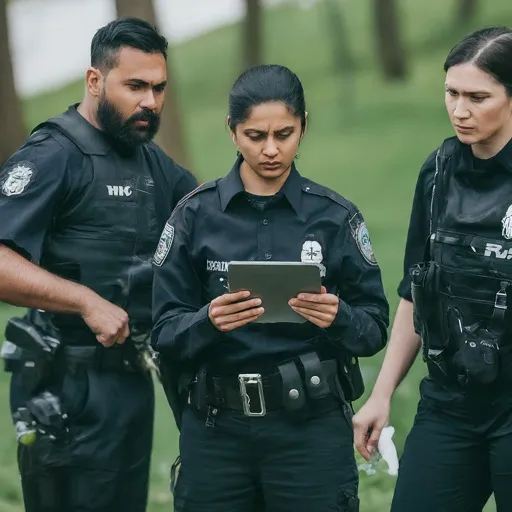
Scenario: Paramedic uses FormConnect app for patient assessment and incident reporting.
Meet Anna, a paramedic responding to a call for a possible cardiac arrest. Here’s how the FormConnect app could assist her during her critical tasks:
- Accessing Patient Information & Incident Details: Upon arrival, Anna opens the FormConnect app and retrieves the prepopulated incident details, including caller information, reported symptoms, and location data. If available, the app might also access the patient’s medical history electronically, expediting crucial care decisions.
- Initial Assessment & Data Capture: As Anna assesses
the patient, she uses the app to:
- Record vital signs: Electronically capture heart rate, blood pressure, oxygen saturation, and other vital signs using integrated sensors or manual input.
- Document observations: Note down the patient’s condition, symptoms, and any relevant medical history details.
- Capture photos: Capture images of injuries or medical equipment for documentation or remote consultation.
- Use pre-defined assessment tools: The app might offer quick checklists or decision trees for specific medical situations, guiding her initial evaluation.
- Communication & Collaboration: While providing care
and communicating with the patient, Anna leverages the app to:
- Share vital signs and observations: Transmit crucial patient data in realtime to other paramedics, doctors, or specialists for collaborative decisionmaking.
- Request additional resources: Request additional medical equipment, specialist consultations, or emergency.
- Treatment & Reporting: As Anna administers treatment
and prepares for transport, she uses the app to:
- Document medications and procedures: Record administered medications,dosages, and any medical procedures performed.
- Generate a preliminary report: The app might pre-populate a report based on captured data, allowing Anna to add details and observations for a comprehensive initial report.
- Electronically sign the report: Electronically sign the report, streamlining documentation and reducing paperwork.
- Submitting & Sharing:
- Before leaving the scene, Anna submits the completed report, patient data, and any photos to the emergency medical services database.
- The app automatically transmits the information to relevant healthcare providers, including hospitals and the patient’s primary care physician, ensuring continuity of care.
Benefits for the First Responders:
Faster & More Accurate Assessments:
Real-time data capture, pre-defined tools, and electronic documentation expedite assessments and minimize errors.
Enhanced Communication & Collaboration:
Real-time data sharing facilitates better coordination between first responders, doctors, and hospitals.
Improved Patient Care:
Faster and more informed treatment decisions can lead to better patient outcomes. lead to better patient outcomes.
Streamlined Reporting & Data Management:
Electronic reports and data integration reduce paperwork and improve data accuracy for future analysis and training.
Increased Operational Efficiency:
The app can optimize resource allocation and response times, enhancing overall emergency medical service operations.
Incident documentation under pressure
- Responders need fast mobile capture during incidents when connectivity is uncertain.
- Paper patient care and incident reports delay handoffs and administrative review.
- Photos, signatures, and narrative notes should stay in one exportable record.
Paper report → digital incident record
- Open the response form
Load incident or patient care report templates on a mobile device before or on scene.
- Document during the response
Capture vitals, notes, photos, and signatures offline if needed.
- Submit for review
Export or sync completed records for administrative and follow-up workflows.
FormConnect features for first responders
Offline incident capture
Complete reports without waiting on cell service at the scene.
Signatures and photos
Attach evidence and sign-off to the same digital record.
Multi-user programs (ProMax)
Support response teams with shared templates and admin tools.
Recommended edition
Multi-user first responder teams typically choose FormConnect ProMax for collaboration, distribution, and broader device support. Learn about FormConnect ProMax · View pricing
Related guides
Next steps for First Responders
FormConnect helps first responders teams replace paper with offline-capable mobile forms. Explore the product that fits your workflow, compare plans, or talk with our team.
- Learn about FormConnect ProMax
- See FormConnect pricing
- Compare Pro, Pro+ & ProMax features
- Compare FormConnect with alternatives
- Browse all industry solutions
- Request a live demo
- Read the FormConnect FAQ
- Visit the FormConnections blog
First Responders FAQ
Can first responders complete incident reports offline?
Yes. FormConnect supports offline incident and patient care documentation so responders can capture data without waiting on connectivity.
Which FormConnect edition fits multi-user response teams?
Multi-user first responder teams typically choose FormConnect ProMax for collaboration, distribution, and broader device support.