Energy & Utilities Safety Audit & Inspection Forms
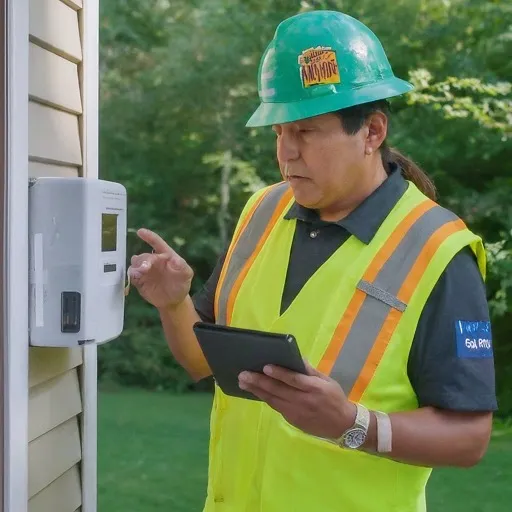
Scenario: Energy technician uses FormConnect app for service call.
Meet Alex, a field technician for GreenVolt Energy. Today, he’s responding to a service call about a potential power outage at a customer’s home. Here’s how the FormConnect app could assist him:
- Accessing Work Order & Customer Information: Upon arrival, Alex opens the FormConnect app and retrieves the assigned work order. He reviews the customer’s information, including contact details, service history, and any reported issues.
- Diagnostics & Data Capture: Alex begins troubleshooting
the power outage using the app to:
- Record observations: He notes down visual inspections of equipment, meter readings, and any error codes displayed.
- Capture photos and videos: He takes pictures of malfunctioning components, damaged wires, or other relevant visual evidence.
- Perform specific tests: The app might guide him through pre-defined diagnostic procedures with step-by-step instructions and data entry fields.
- Customer Interaction & Communication: While explaining
his findings and troubleshooting steps to the customer, Alex leverages
the app to:
- Share photos and videos: Visual aids clarify the issue and potential solutions for the customer.
- Document customer feedback and concerns: The app allows him to capture any additional information or questions from the customer.
- Reporting & Next Steps: Back in his van, Alex uses
the app to:
- Complete a standardized service report.
- Recommend solutions: Depending on the app’s features, it might suggest potential repair actions or escalate the issue for further evaluation.
- Schedule follow-up appointments: If needed, he can directly schedule a followup visit within the app for repairs or further assessments.
- Obtain a digital signature: Allow the customer to electronically sign the service report for immediate acknowledgment and recordkeeping.
- Submitting & Sharing: With a tap, Alex submits the completed report and recommendations to company management. The app automatically sends a copy of the report to the customer for their reference.
Benefits for the Energy & Utilities Business:
Increased Efficiency:
Streamlined data capture, pre-built forms, and digital signatures save time and paperwork.
Improved Accuracy:
Real-time data entry minimizes errors and ensures comprehensive reporting.
Enhanced Customer Service:
Sharing photos, videos, and detailed reports fosters trust and understanding.
Data-driven Insights:
Consolidated data from service reports can inform maintenance strategies and improve service quality.
Streamlined Workflows:
Electronic submissions and data flow automation improve operational efficiency.
Energy and utilities field documentation gaps
- Crews work in remote locations where connectivity and printers are unreliable.
- Safety audits and equipment inspections need photos and notes in one defensible record.
- Office teams lose time re-keying handwritten compliance checklists.
Paper audit → digital safety record
- Deploy standardized checklists
Use digital safety audit and equipment inspection templates built for your program.
- Inspect in the field
Capture findings, photos, and notes offline during the site visit.
- Report and follow up
Export or sync completed records for compliance reporting and corrective actions.
FormConnect features for energy teams
Offline safety audits
Complete inspections without live network access in remote areas.
Evidence with the record
Keep photos and narrative notes attached to each submission.
Team scale with ProMax
Coordinate multiple field crews with shared forms and admin controls.
Recommended edition
Energy and utilities programs with multiple inspectors or crews typically choose FormConnect ProMax for collaboration and admin tools. Learn about FormConnect ProMax · View pricing
Related guides
Next steps for Energy
FormConnect helps energy teams replace paper with offline-capable mobile forms. Explore the product that fits your workflow, compare plans, or talk with our team.
- Learn about FormConnect ProMax
- See FormConnect pricing
- Compare Pro, Pro+ & ProMax features
- Compare FormConnect with alternatives
- Browse all industry solutions
- Request a live demo
- Read the FormConnect FAQ
- Visit the FormConnections blog
Energy FAQ
Can FormConnect handle safety audits in the field?
Yes. Energy and utilities teams use FormConnect for safety audits, equipment inspections, and compliance checklists on mobile devices.
Do FormConnect forms work without cell service?
Yes. Offline data collection is supported so crews can complete forms in remote locations and sync later.